InboxKit Alternative: Detect
Burned Inboxes With Peeker
Stop babysitting your email infrastructure. See how Peeker's self‑healing inboxes eliminate the manual work InboxKit requires.
Trusted by 500+ Leading Cold Email Teams
 Scale Your Leads
 ClientPush
 O
 Boardy
 EverOutBoundScale Your LeadsClientPushOBoardyEverOutBoundScale Your LeadsClientPushOBoardyEverOutBoundScale Your LeadsClientPushOBoardyEverOutBound

How Peeker Compares To InboxKit
InboxKit facts come from InboxKit's own website and were checked on November 6, 2026.
| Feature |  |  |
|---|---|---|
| What you get | Google Workspace and Microsoft (Azure) inboxes, set up for you | Google, Microsoft 365 and Azure mailboxes |
| Price | Google $3.50 down to $2.80 per inbox. Microsoft $60 per domain with 50 inboxes ($30 from 250 domains) | $3.00 per mailbox monthly, $2.50 on annual. Azure $30 per tenant |
| Setup time | Under 12 hours, most orders in 2 to 4 hours | Not stated |
| Inbox health monitoring | Included for every inbox: reply rates, bounces and spam placement | InfraGuard add-on: checks every 6 hours |
| Burned inbox detection | Automatic, included | InfraGuard alerts and auto-pause |
| Burned inbox replacement | Automatic swaps, included | Not stated |
| Sequencer connections | Instantly, Smartlead, EmailBison, PlusVibe | 24+ sequencers, including Instantly and Smartlead |
What is InboxKit?
InboxKit sets up Google Workspace, Microsoft 365 and Azure mailboxes for outreach teams, priced per mailbox with no minimum.
Why teams look for a InboxKit alternative
- Monitoring is a paid add-on, and the site describes pausing problem mailboxes but not replacing them. Source
- Warmup is another add-on at $3 per mailbox per month. Source
When InboxKit is the better pick
Pick InboxKit if you want low-cost mailboxes with no minimum and you are fine running monitoring and replacements yourself.
InboxKit facts checked on November 6, 2026: InboxKit pricing, InboxKit home page
Why Cold Emailers Love Peeker
Why Cold Emailers Love Peeker
Cold emailers need infrastructure that works without constant babysitting. Peeker gives you inboxes that track their own health and replace themselves before deliverability tanks.
001
Real-Time Deliverability Tracking
Track actual inbox health using reply rate data and performance metrics. Know which domains are healthy, underperforming, or burned before your campaigns suffer.
Deliverability Analytics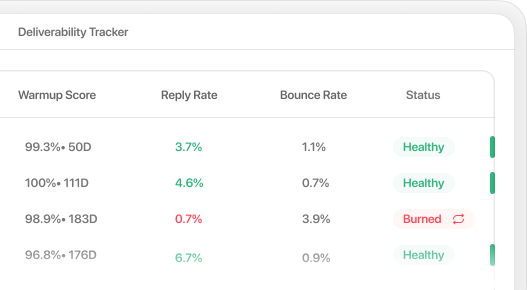
002
Automated Inbox Swaps
When an inbox gets flagged, swap it for a fresh one automatically. No manual intervention, no downtime, no lost sending capacity.
Auto Replacement & Swapping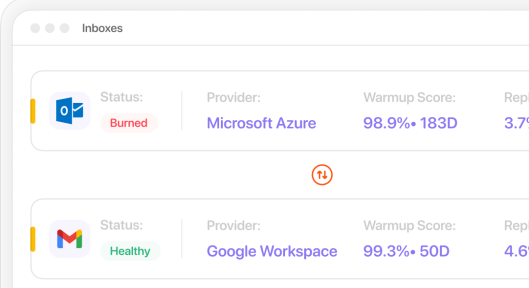
See Why Cold Emailers
Made the Switch from InboxKit
Teams switch to Peeker when they're tired of burned inboxes killing their campaigns without warning.
Peeker vs InboxKit
Questions
What teams ask before switching from InboxKit to Peeker.
Get Inboxes That Actually Work
Stop losing deals to infrastructure you can't see. Start with tracking that tells you when problems happen.
Explore AI Summary


